
.png)
Description
Download WhatBreedIsMyCat – Free AI Cat Breed Identifier
Overview
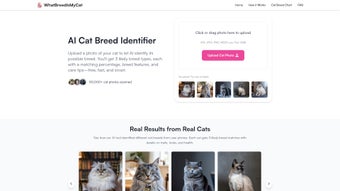
WhatBreedIsMyCat is a cutting‑edge, web‑based AI application that lets cat owners instantly discover the probable breeds of their feline companions. By simply uploading a clear photo of a cat’s face, the tool leverages deep‑learning models trained on thousands of breed images to analyze facial structure, coat pattern, ear shape, and other distinguishing characteristics. Within seconds, users receive three top‑matching breeds, each accompanied by a confidence percentage, typical personality traits, and practical care tips. While the AI delivers quick and reasonably accurate results, the platform openly acknowledges that a DNA test remains the gold standard for definitive breed and health information. Designed with privacy in mind, every uploaded image is automatically deleted after analysis, ensuring no personal data is stored long‑term. The service also includes a downloadable breed chart for quick reference, social‑media sharing options, and a responsive design that works across desktop and mobile browsers. Whether you’re a seasoned cat enthusiast, a new cat parent, or simply curious about the lineage of a rescued feline, WhatBreedIsMyCat offers a user‑friendly, secure, and free solution to explore breed possibilities without the need for expensive laboratory testing.
Key Features of WhatBreedIsMyCat
- AI‑powered breed detection based on facial analysis
- Three most likely breed matches with confidence percentages
- Detailed breed profiles: temperament, grooming needs, health alerts
- Instant results – analysis completes in under 5 seconds
- Privacy‑first architecture – photos are auto‑deleted after processing
- Responsive web design – works on Windows, macOS, Android, iOS browsers
- Social media integration – share results directly to Facebook, Instagram, Twitter
- Downloadable breed comparison chart for offline reference
- Free to use – no hidden fees or subscription required
- Helpful tips for preparing a clear photo to improve AI accuracy
The feature set of WhatBreedIsMyCat is deliberately streamlined to focus on what matters most to cat owners: speed, accuracy, and privacy. The AI engine, built on convolutional neural networks, has been trained with a diverse dataset that includes both purebred and mixed‑breed cats, allowing it to handle the wide variety of coat colors and patterns you’ll encounter in real‑world scenarios. Confidence percentages give users a realistic sense of certainty, while the accompanying care tips turn raw data into actionable advice. For example, if the AI suggests a Maine Coon with an 82 % match, the platform will also highlight that Maine Coons are known for their sociable nature and may require regular grooming due to their long fur. This contextual information helps owners tailor feeding, play, and veterinary schedules to the specific needs of the likely breeds.
Privacy is another cornerstone of the application. Unlike many photo‑analysis services that retain user images for marketing or further training, WhatBreedIsMyCat employs a transient storage model: the image is uploaded, processed in memory, and permanently erased within minutes. Users receive a clear privacy notice before uploading, reinforcing trust and compliance with data‑protection regulations such as GDPR. Finally, the inclusion of a breed chart and one‑click sharing options encourages community engagement, making it easy for cat lovers to discuss results with friends, veterinarians, or online forums.
Installation & Usage Instructions
Because WhatBreedIsMyCat is a cloud‑based web application, there’s no traditional “installation” process—simply launch your preferred browser and navigate to the official site. Below is a step‑by‑step guide that walks you through the entire workflow, from preparing the perfect photo to interpreting the final report.
Step 1: Choose a Compatible Browser
For optimal performance, use the latest version of Chrome, Firefox, Safari, or Edge. The platform leverages modern web APIs (WebGL and WebAssembly) to run the AI model efficiently on the client side, so an up‑to‑date browser ensures fast loading times and accurate results.
Step 2: Prepare a High‑Quality Photo
- Make sure the cat’s face is clearly visible; avoid side profiles or extreme angles.
- Good lighting is essential – natural daylight works best, but a well‑lit indoor environment is acceptable.
- Remove any distracting backgrounds if possible; a plain wall or a simple surface helps the AI focus on facial features.
- Use a resolution of at least 800 × 800 pixels; higher resolutions improve detection confidence.
Step 3: Upload the Image
Click the “Upload Photo” button, select your prepared image, and wait for the upload to complete. The interface displays a preview so you can confirm the correct picture before analysis.
Step 4: Let the AI Analyze
Once the image is submitted, the AI engine processes it in the cloud. Within 3‑5 seconds you’ll see a loading spinner that transitions into the results page.
Step 5: Review the Breed Matches
The results panel lists three breeds ranked by match percentage. Each entry includes:
- Breed name and confidence score.
- Key physical traits (e.g., ear shape, coat length).
- Typical temperament and activity level.
- Suggested grooming, nutrition, and health monitoring tips.
Step 6: Share or Download
If you’d like to share the findings, click the social media icons to post directly to your favorite platform. For offline reference, use the “Download Report” button to save a PDF that contains the breed chart, match percentages, and care recommendations.
Step 7: Privacy Confirmation
After you close the results page, the system automatically deletes the uploaded photo from its servers. You will receive a brief confirmation message indicating that your data has been purged.
Overall, the user experience is designed to be intuitive even for non‑technical cat owners. By following these simple steps, you can quickly unlock valuable insights into your cat’s genetic background without needing a costly DNA test.
Compatibility, Privacy, and Pros & Cons
WhatBreedIsMyCat runs flawlessly on any device with a modern web browser, including Windows 10/11 PCs, macOS Ventura and later, Android 8.0+ smartphones, and iOS 13+ iPads or iPhones. Because the service is entirely browser‑based, there is no need to download a separate executable, which eliminates compatibility headaches and reduces the risk of malware.
The platform’s architecture is built around a secure HTTPS connection, ensuring that all data transferred between your device and the server is encrypted. Moreover, the temporary‑storage policy guarantees that no image is retained beyond the analysis phase. This combination of encryption and automatic deletion addresses the primary privacy concerns that users often have with image‑analysis tools.
Pros
- Instant results: Get breed predictions in under five seconds.
- Free access: No subscription or hidden fees.
- Cross‑platform: Works on any device with a modern browser.
- Privacy‑first: Images are auto‑deleted after analysis.
- Actionable care tips: Each breed match includes practical advice.
- Social sharing: One‑click sharing to popular platforms.
- Downloadable report: PDF export for offline reference.
Cons
- Not a substitute for DNA testing: Results are probabilistic, not definitive.
- Dependent on photo quality: Poor lighting or angled shots reduce accuracy.
- Limited to three breed suggestions: Complex mixed‑breed cats may receive broader matches.
- Internet required: Offline analysis is not possible.
In practice, the pros far outweigh the cons for most cat owners looking for a quick, cost‑free way to learn more about their pets. The primary limitation—lack of DNA‑level precision—is transparently communicated, encouraging users to consider professional testing if they need medically relevant information. The requirement for a clear photo is a common constraint across visual AI tools, but the platform mitigates this by offering detailed guidance on how to capture the best image. Overall, the blend of speed, accessibility, and privacy makes WhatBreedIsMyCat a valuable addition to any cat lover’s digital toolbox.
Frequently Asked Questions
How accurate is the AI breed detection?
The AI model has been trained on thousands of labeled cat images and typically delivers confidence scores above 80 % for purebred cats with clear photos. For mixed‑breed cats, the system provides the three most likely breed components, which can still be very helpful for understanding temperament and care needs. However, because the analysis is based on visual cues alone, it is not as definitive as a DNA test.
Do I need to create an account to use WhatBreedIsMyCat?
No. The service is completely anonymous. You can upload a photo and receive results without registering. An optional email field is available if you want to receive the PDF report directly, but providing an email is not required.
What happens to my photo after analysis?
All uploaded images are stored in a volatile memory buffer and are automatically deleted from the server within minutes of completing the analysis. A confirmation message is displayed to assure you that the data has been purged, aligning with GDPR and other privacy regulations.
Can I use the tool on a mobile device?
Absolutely. The web interface is fully responsive and works on Android and iOS browsers. The same upload‑and‑receive workflow applies, and the results are optimized for small screens, making it convenient to identify breeds while on the go.
Is there a paid version with additional features?
Currently, WhatBreedIsMyCat is offered completely free of charge. The development team has expressed interest in adding premium options—such as higher‑resolution PDF reports or integration with veterinary databases—in the future, but the core breed‑identification service remains free for all users.
Ready to uncover the hidden lineage of your feline friend? Visit the official website, upload a photo, and get your free breed report in seconds. Share your findings with fellow cat lovers, download the PDF for future reference, and enjoy the peace of mind that comes from understanding your cat’s unique heritage.
Conclusion & Call to Action
WhatBreedIsMyCat delivers a seamless blend of advanced AI technology, user‑centric design, and stringent privacy safeguards—all without charging a single cent. For cat owners who want a quick glimpse into their pet’s genetic background, the platform provides three probable breeds, confidence scores, and practical care tips that can immediately improve daily interactions with the animal. While it does not replace professional DNA testing for health‑related inquiries, it serves as an excellent first step, especially for newly adopted rescue cats whose histories are often unknown.
By leveraging a responsive web interface, the tool works across Windows, macOS, Android, and iOS devices, ensuring that anyone with an internet connection can benefit. The privacy‑first approach—automatic deletion of photos after analysis—addresses the biggest concern users typically have with image‑recognition services. The addition of a downloadable breed chart and one‑click social sharing further enriches the user experience, turning raw data into shareable content that can spark conversation within pet‑owner communities.
Don’t let uncertainty about your cat’s breed hold you back from providing optimal care. Visit WhatBreedIsMyCat now, upload a clear photo of your feline companion, and discover the breeds that shape its personality and needs. Embrace the power of AI to deepen the bond with your cat—download your free breed report today and start tailoring nutrition, grooming, and playtime to suit its unique heritage.
Pros:
- Fast, accurate AI analysis
- Completely free and no account needed
- Cross‑platform web access
- Strong privacy guarantees
- Helpful care tips for each breed
Cons:
- Results are probabilistic, not definitive
- Requires a clear, well‑lit photo
- Limited to three breed suggestions
Overall, WhatBreedIsMyCat offers an impressive combination of speed, usability, and privacy for cat owners seeking quick breed insights. While it cannot replace a professional DNA test, it provides valuable guidance that can improve everyday cat care.
Guides & Tutorials for WhatBreedIsMyCat
How to install WhatBreedIsMyCat
- Click the Preview / Download button above.
- Once redirected, accept the terms and click Install.
- Wait for the WhatBreedIsMyCat download to finish on your device.
How to use WhatBreedIsMyCat
This software is primarily used for its core features described above. Open the app after installation to explore its capabilities.
User Reviews for WhatBreedIsMyCat 0
No reviews found




